Downhill Racer
v31.2.0

Download APK Safe - Fast - Free!

Dive into the hilarity of the Human: Fall Flat apk, a unique physics-based puzzle platformer where you guide a wobbly “Bob” through surreal dreamscapes. Master the unpredictable Active Ragdoll mechanics to conquer environmental puzzles or join friends for chaotic Multiplayer fun. Visit GB Plus Apps today for a high-speed, secure Human: Fall Flat download. Get the latest version now to explore the Copper World and master the art of the climb!
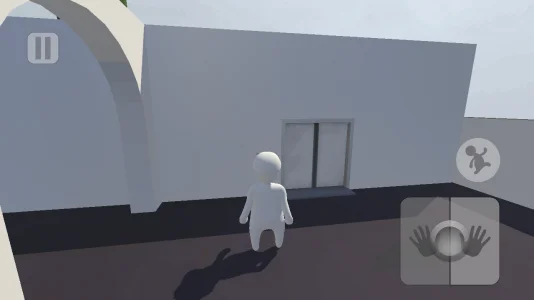
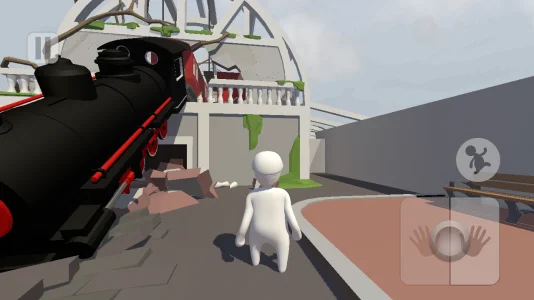
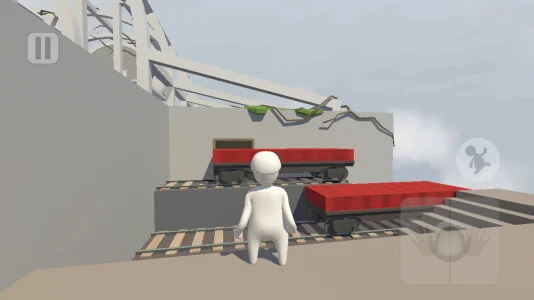
Human: Fall Flat stands as a distinct outlier in the mobile gaming landscape, successfully translating a complex physics sandbox from PC to handheld devices without losing its chaotic charm. Originally conceptualized by No Brakes Games and its founder Tomas Sakalauskas, this title is a physics-based puzzle platformer where the primary challenge is not fighting enemies, but fighting the laws of physics themselves. The mobile iteration, expertly ported by Codeglue and published globally by 505 Games, brings the complete "Active Ragdoll" experience to Android and iOS.
The core identity of the Human: Fall Flat apk lies in its deliberate clumsiness. Players control "Bob," a featureless, wobbly avatar whose movements are driven by a simulated physics engine rather than pre-canned animations. This creates a gameplay loop defined by "Slapstick Failure," where the struggle to perform mundane tasks—like climbing a ledge or opening a door—becomes the source of entertainment. While the game falls under the simulation genre technically, its market positioning is unique, offering a premium, console-quality experience that separates it from standard mobile casual games.
The gameplay loop of Human: Fall Flat is linear in structure but open-ended in execution. Each session begins with a drop from the sky into a surreal dreamscape, and the objective is to navigate the environment to find an "Exit," which triggers a fall into the next level. The mobile port introduces specific touch-screen optimizations, including a virtual joystick for movement and dedicated buttons for arm control, replacing the dual-mouse input of the PC version.
The title offers distinct modes of play that cater to different styles:
A common misconception involves the pricing model. While many mobile users search for Human: Fall Flat free versions, the global release by 505 Games is a strictly Premium (Pay-to-Play) title with no In-App Purchases (IAP). This distinguishes it from the XD Network version in China, which uses a free-to-start model. The global version ensures that once purchased, all content is accessible without paywalls.
The visual language of Human: Fall Flat utilizes a low-poly, minimalist art style. This aesthetic choice is functional; by using simplified geometry and "Baked Lighting," Codeglue optimized the game to run on mobile processors (ARM64) while maintaining the complex physics calculations required for the simulation. The lack of textures on the character allows for extensive customization, while the environments are distinct and thematic.
The game features a massive roster of levels that have been ported over time. Players traverse the domestic puzzles of Mansion, the industrial machinery of Power Plant, and the nautical challenges of Water. Furthermore, 505 Games has integrated community-favorite levels from the Steam Workshop into the official mobile build as free updates. These include the intricate Thermal level, the vertical challenges of Tower, and recent additions like Copper World and the Museum, ensuring the mobile visuals and content match the console experience.
Unlike RPGs, there is no statistical character progression in Human: Fall Flat. "Bob" does not level up or gain strength. Instead, progression is entirely meta-dependent, relying on the player's mastery of the controls. The community has developed a "Meta" centered around movement efficiency and exploiting the physics engine to bypass intended solutions.
High-level play involves techniques such as the Extended Climb, a rhythmic input method where players release and re-grab walls to scale infinite heights, and the Dolphin Dive, used to cross wide gaps. Speedrunners utilize these moves to skip entire sections of maps like Castle or Aztec. On mobile, executing these techniques is significantly harder due to touch controls, leading many serious players to use HID-supported controllers (Xbox or PS4), despite known issues like the "Spinning Camera" bug on certain Android versions.
The economy of the game is straightforward: it is a premium purchase. There are no "Whale" mechanics or premium currencies in the global edition. All skins, including the Builder, Ninja, and Astronaut, are unlocked through gameplay or achievements. However, the technical nature of the Unity engine and the IL2CPP scripting backend has led to a vibrant, albeit grey-market, modding scene.
Players frequently seek a Human: Fall Flat mod to alter the physics engine. Common modifications include Speed Hacks for traversing large maps, Super Jumps to bypass climbing puzzles, and License Bypasses to circumvent the Google Play verification. While these mods can enable "God Mode" or "No Clip" flying, they often break the P2P multiplayer synchronization, causing visual desync for other players in the lobby.
For a legitimate installation, users must ensure their device runs Android 5.0+ or iOS 13.0+. The installation requires a base APK and a large OBB (Opaque Binary Blob) file, typically around 1.5 GB, which houses the level assets. To ensure a stable multiplayer experience and avoid the risks of malware associated with unsigned APKs, the safest route is the official Human: Fall Flat download via the Google Play Store or Apple App Store, which guarantees compatibility and access to cloud saves.
The core gameplay loop of Human Fall Flat revolves around the “Active Ragdoll” system. Unlike traditional platformers where movement is precise, your avatar, known as Bob, is physically simulated at all times. The objective is to navigate 3D environments by solving physics-based puzzles, eventually reaching the Exit to fall into the next dream level. Mastering the controls is the first step to overcoming the intentional “clumsiness” of the game.
The mobile port by Codeglue utilizes a virtual overlay that simulates dual-arm movement. To initiate your first Human Fall Flat download session successfully, you must understand how to manipulate the camera to influence physics:
Once you have the Human Fall Flat apk installed, you have access to three primary ways to play, though the mobile version streamlines the experience compared to PC.
This is the primary campaign where you tackle puzzles alone. It is fully playable offline, making it ideal for travel. You will progress through levels like Mansion, Train, and the complex Castle. The lack of time limits allows for experimentation with the physics engine without pressure.
The mobile version supports up to 4 players in a lobby. This mode relies on a Peer-to-Peer (P2P) architecture. One player acts as the host. Because physics are calculated in real-time across devices, the experience is cooperative but chaotic. Players can grab, push, and throw each other. While a Human Fall Flat mod might exist to alter lobby sizes unofficially, the official game caps this at 4 to prevent “Physics Desync” on mobile processors.
In multiplayer, puzzles often become easier—or harder—depending on coordination. For example, in the Power Plant level, one player can hold two wires together to complete a circuit while another passes through the door. However, “friendly fire” interactions often lead to players dragging their teammates off cliffs for comedic effect.
Human Fall Flat operates on a premium model with no traditional leveling stats (Strength, Agility, etc.). Progression is entirely based on player skill and unlocking cosmetic items. There are no “Pay-to-Win” elements. Below is a breakdown of the game’s economy and resource management for a standard player versus someone looking for a Human Fall Flat free content experience.
| Resource Type | How to Earn / Unlock | Best Strategic Use |
|---|---|---|
| Cosmetic Skins | Unlocked via Achievements, Exploration, or default access. | Visual customization (e.g., Ninja, Astronaut) to distinguish yourself in Multiplayer. |
| New Levels | delivered via automatic Free Updates (e.g., Copper World, Museum). | Extending playtime. Ensure your app is updated to access these new maps. |
| Checkpoints | Triggered by walking over specific zones in a level. | “Save Scumming.” Intentionally jumping off the map to respawn closer to a puzzle. |
It is important to note that the global version published by 505 Games has zero In-App Purchases. All skins are earned through gameplay, unlike the regional Chinese version which features paid cosmetics.
Because the game lacks combat, the “Meta” is defined by movement efficiency and “breaking” the intended puzzle solutions. High-level players and speedrunners utilize specific tech to bypass obstacles.
This is the most critical technique to master. A standard climb involves pulling yourself up a ledge. The Extended Climb allows you to scale infinite vertical walls. To do this:
This is harder on touchscreens than controllers, but essential for levels like Mountain.
Used to cross gaps wider than a normal jump permits. To execute, run, tap Jump, and immediately look down while holding your arms forward. This extends Bob’s hitbox, allowing him to grab the far ledge with his head or hands. This move is often more reliable than a standard jump in the Aztec level.
In levels like Castle, low walls are meant to guide you through a maze. The Meta strategy is to simply “Mantle” (pull yourself up and over) these walls, skipping entire puzzle sequences. While you might be tempted to search for a Human Fall Flat mod to enable flying, learning to mantle effectively breaks the game legitimately and is far more rewarding.